How Argus ACLI works
Argus checks the system. AI explains the signal.
Argus ACLI is not an AI model guessing from pasted logs. Argus performs controlled, read-only system checks, structures the telemetry, identifies findings, preserves evidence, and then passes that grounded diagnostic data to the model for plain-language interpretation and next steps.
The idea
System checks first. AI interpretation second.
Argus does the system inspection. The model does not freely roam the machine. It receives structured findings from Argus and helps explain what those findings mean.
The diagnostic flow
Argus shortens the first stage of troubleshooting.
The expensive part of an outage is often the first question: what is actually wrong?
Ask naturally
Use plain language instead of memorizing which diagnostic command to run first.
acli what is wrong with this system
Argus inspects
Argus runs controlled, read-only checks through NeuroCore’s structured tool layer.
Argus structures
System telemetry becomes severity, findings, recommendations, and raw supporting evidence.
AI explains
The model interprets Argus’s structured diagnostic data and suggests next investigation steps.
Why this matters
Less time hunting. More time fixing.
Linux systems already expose a massive amount of information. The hard part is knowing which signal matters, what it means, and what to investigate first.
Argus is designed to reduce time to resolution by turning scattered system state into a clear diagnostic picture before the model ever explains it.
Argus detects high usage on mounted filesystems.
Argus identifies that one interface is currently not up.
Argus confirms memory pressure does not appear to be the cause.
Argus finds no runaway process in the current sample.
Not a chatbot wrapper
The model does not guess from raw terminal paste.
Chatbots can explain what you paste into them. Argus is different: it performs the system inspection first, structures the results, and gives the model grounded diagnostic data to explain.
Typical chatbot workflow
- Manually run Linux commands
- Copy logs and terminal output
- Paste sensitive data into a cloud tool
- Hope the context is complete
- Manually verify every assumption
Argus ACLI workflow
- Ask from the terminal
- Argus performs read-only system checks
- Argus structures telemetry into findings
- The model explains Argus’s evidence
- Users can review raw evidence when needed
Current working build
Real diagnostics are already running.
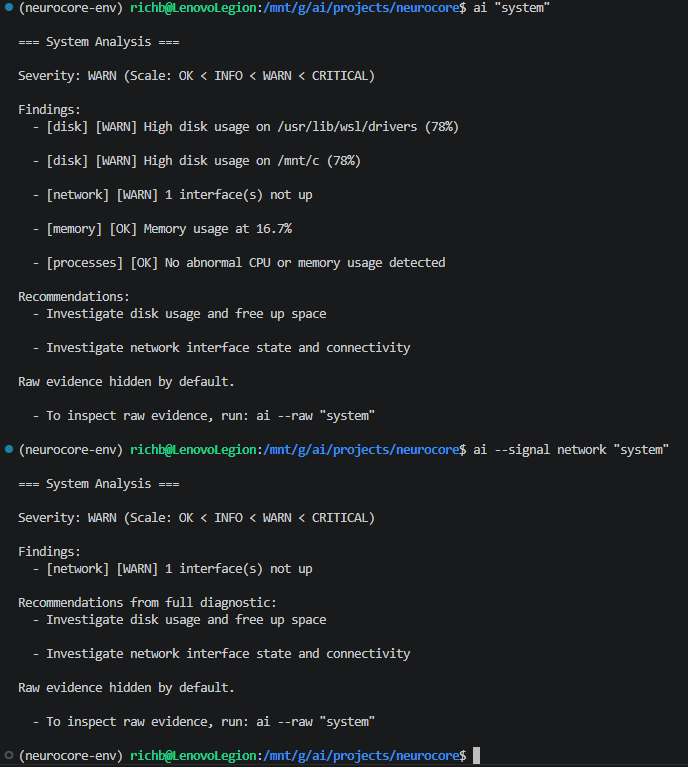
The landing page shows the intended natural-language Argus experience. This section shows the current build proving the diagnostic model: controlled checks, structured output, severity, findings, recommendations, filtering, and raw evidence.
What the current build proves
- Argus runs real read-only system checks.
- System signals are grouped by domain: disk, memory, network, and processes.
- Severity is explicit: OK < INFO < WARN < CRITICAL.
- Raw evidence is preserved instead of hidden behind AI output.
Trust model
Argus explains systems without giving AI control.
Version 1 is read-only by design. Argus can inspect the system, produce structured findings, preserve evidence, and provide the model with grounded data to explain — but it does not modify files, restart services, change configuration, or execute fixes.
Local-first
Your system data stays on your machine. No sensitive log uploads required.
Read-only
Argus inspects and explains. It does not make changes to your system.
Evidence-backed
Findings are supported by raw evidence so users can verify the source data.
Built on NeuroCore
NeuroCore provides the controlled runtime and structured tool foundation underneath Argus.
Built in public
Follow Argus as it moves toward installable V1.
The current focus is turning Argus ACLI into a practical, natural-language Linux troubleshooting assistant while keeping system inspection controlled, local-first, read-only, and grounded in real machine state. Initial V1 development is targeting Ubuntu-compatible Linux systems, with support for other major distributions planned shortly after.